mirror of https://github.com/Freeboard/plugins.git
 9db01a74b4 |
||
|---|---|---|
| datasources | ||
| widgets | ||
| .gitignore | ||
| README.md | ||
README.md
freeboard.io-node.js
This is a datasource plugin to connect freeboard.io dashboards to real-time node.js servers.
- Subscribe to real-time events using WebSockets (Sockets.io)
- Listen for events from different servers
- Restrict events from only certain namespaces or rooms
Installation
-
Place the file
/datasources/plugin_node.jsin/js/freeboard/pluginsof your freeboard.io installation. -
Edit your freeboard.io main HTML file and add the plugin to the header:
<script type="text/javascript">
	head.js(
			...
			"js/freeboard/plugins/plugin_node.js",
Testing
- You can test this plugin by running the node.js sample server (located in the
/datasources/plugin_nodejs_sample/folder) with this command:
node plugin_node_sample_server.js
- Open the sample freeboard.io client with your browser, e.g. Chrome, located at:
/datasources/plugin_nodejs_sample/plugin_node_sample_client.html
Requirements
To run the sample server make sure you have following dependencies installed:
Screenshots
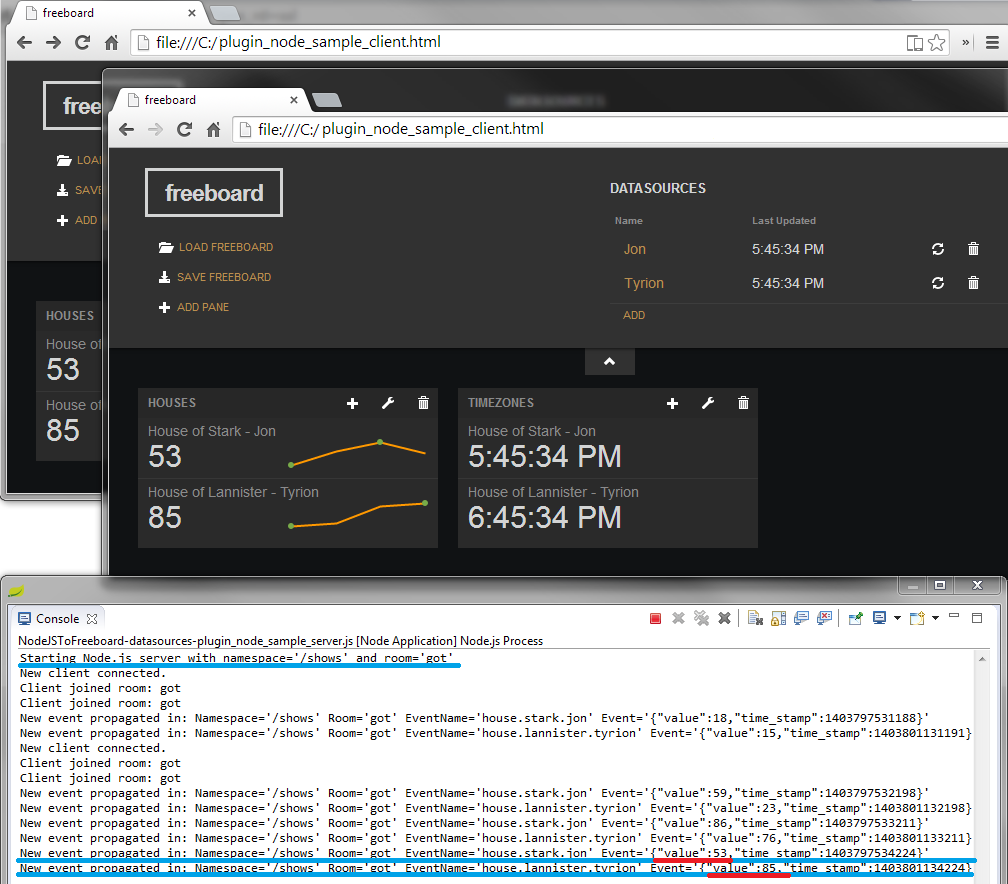
In this screenshot, you can see the sample server and dashboard running with multiple clients receiving data in real-time.
License
MIT